Reference
Platform
Scans run on your machines. Atmosphere Platform at app.atmoslab.dev issues your tokens, delivers the Managed Ruleset and shows your findings on the Findings page and on pull requests.
Sign-ins and the Workspace Token#
On your own machine the CLI authenticates with the sign-in atmos login stores: a link opens in your browser, you approve, and every scan from that machine runs as you, into the workspace you chose when you approved it. See the workspace a CLI sign-in scans into. Each signed-in machine is listed on the Tokens page, where you can revoke it. atmos logout does the same from the terminal. A sign-in expires after a year. Every browser signed in to your account is listed under Sessions on the Account tab of Settings, with when it signed in, and you can sign out any other browser there.
CI and other headless environments use a Workspace Token, a credential starting with atmos_ws_. Owners and admins create it on the Tokens page and pass it as ATMOS_TOKEN or --token, which takes precedence over any stored sign-in. The token is shown exactly once and expires after 90 days unless you pick another date or No expiration when you create it. A token stops working when someone revokes it or when the workspace is deleted. It also stops working when the person who created it leaves the workspace, is removed from it or becomes a member or viewer there. For handling guidance, see best practices.
Findings and Metrics#
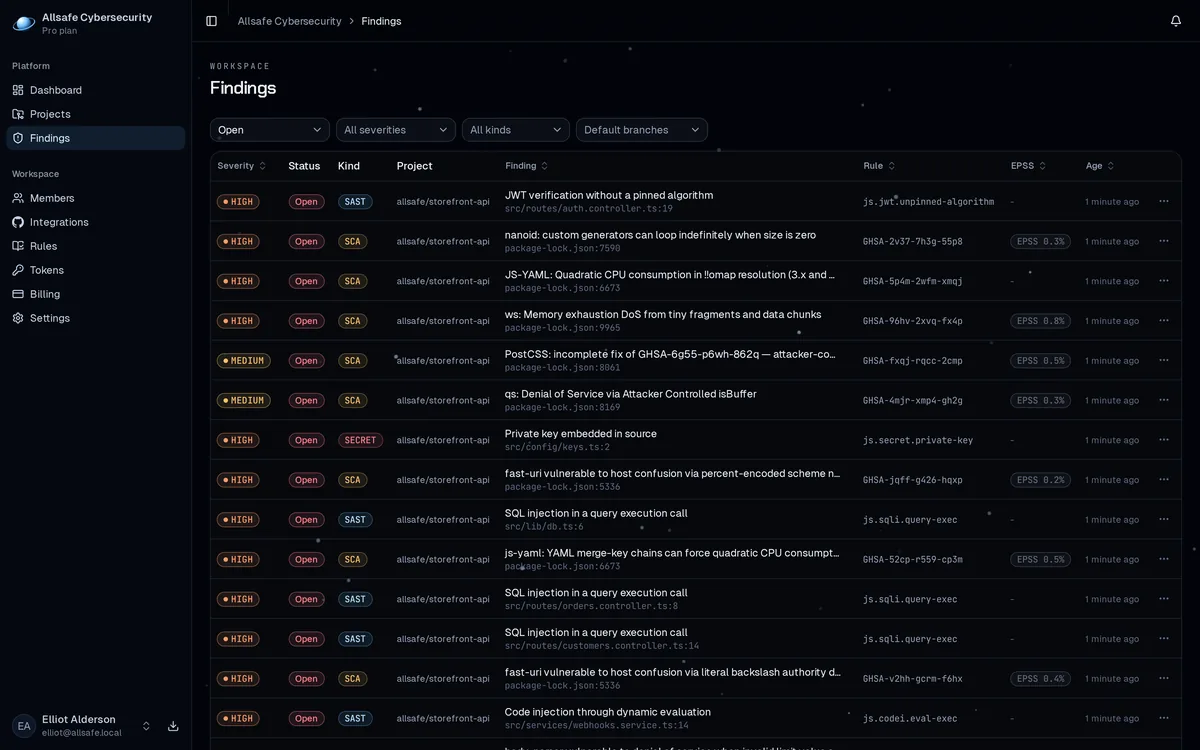
The Findings page lists the findings of every project in the workspace. A scan opens a finding and marks it Fixed once a later scan no longer reports it, as when findings close describes. False positive, Accepted and Ignored come from triage on the Findings page or from .atmos-ignore.yaml, and ignoring findings covers both and what each one does to the build.
The Metrics page charts scans and the findings introduced and fixed each day, for one project or for all of them. Days run midnight to midnight UTC.
Delete a project#
Owners and admins delete a project under Delete project on the project's Settings page. The project's scans and findings go with it, and its activity from the last 90 days still counts in Metrics. A new scan of the repository adds it back as a new project. On Free, that scan can stop instead and print that the workspace has reached its repository limit. The pricing page has the terms of each plan.
Managed Ruleset#
A code scan receives the Managed Ruleset, the detection rules Atmos maintains and updates on the platform, with no rule files for you to manage. Your own rules load with it, in the order given in custom rules.
Pull request feedback#
With the GitHub App connected, a CI scan of a pull request posts a check on the pull request and one comment that updates in place on every new scan. The check fails on new critical and high findings by default. Without the GitHub App, findings still show on the Findings page and the exit code gates the build. CI and pull requests covers what the check skips and other CI systems.
What leaves your machine#
Scans run in your CI or on your machine, and the platform never clones your repositories. What it receives is:
- the findings, with severity, message and rule id,
- the repository identity, with the branch, the commit and any pull request number,
- file paths relative to the repository root, with line and column numbers,
- a one-way hash of each flagged line, so the platform can tell findings in one file apart and follow a finding when the code around it moves,
- the kind of scan, code or dependencies, and the folder or file it covered,
- the trace behind each finding, as a sequence of those locations with the function names along it,
- for dependency findings, the package, the resolved version, the advisory id and the dependency path,
- one-way hashes of the committer email addresses from the last 90 days,
- the CLI version, and for a dependency scan the number of lockfiles and packages it read.
Source text is not part of that. The matched line is omitted from findings and from traces unless you pass --snippets yourself, and a secret value in that line is masked. With --no-upload the findings stay local. Every scan still sends the repository identity, the committer hashes and the branch when there is one, and a dependency scan also sends the CVE ids it found to look up their EPSS scores.
The committer hashes are pseudonymous personal data. The Privacy Policy covers why Atmos collects them.
EPSS scores#
Dependency findings with a CVE carry EPSS scores, which estimate exploit probability, so the backlog sorts by real-world risk instead of raw severity. EPSS scores are published by FIRST.